

Clean Image AI-Powered Photo Cleanup
Clean Image is a private, client-side AI tool that removes text, logos, and blemishes from photos instantly without uploading your data.
product Details
Explore More
Alternatives
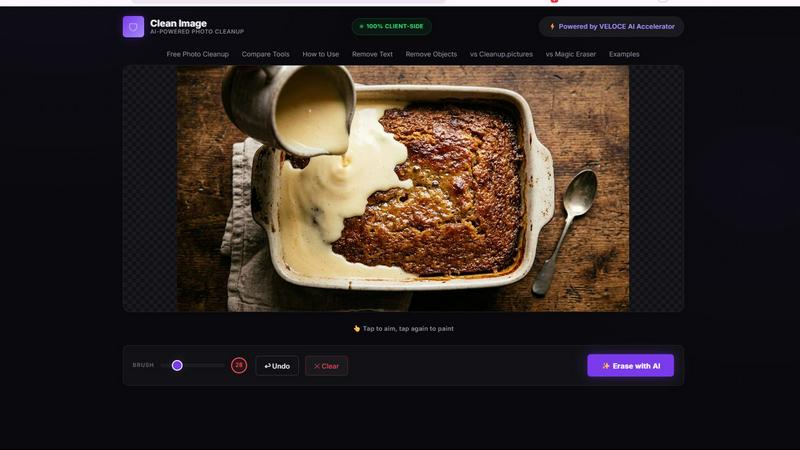
About Clean Image AI-Powered Photo Cleanup
Clean Image AI-Powered Photo Cleanup is a free, browser-based tool that uses artificial intelligence to remove unwanted elements from your photos. This includes text overlays, logos, date stamps, watermarks, and small blemishes. The core value proposition of Clean Image is its uncompromising commitment to privacy. Unlike most online photo editing tools that require you to upload your images to a remote server, Clean Image runs entirely on your local machine. All processing happens within your browser using advanced technologies like ONNX Runtime Web and WebAssembly. This means your images never leave your device, ensuring complete data security and confidentiality. The tool is powered by the OpenCV LaMa inpainting model, a sophisticated neural network that intelligently reconstructs the areas you brush over by analyzing and blending the surrounding pixels. It is designed for both personal and commercial use, making it a versatile solution for content creators, marketers, e-commerce sellers, and everyday users who need to clean up images quickly. The tool is particularly effective on images with clean backgrounds where the unwanted elements are text, logos, or small objects. There are no accounts to create, no subscriptions to manage, and no hidden costs. After the initial load, the AI model caches in your browser, allowing for instant future use with zero data usage. Clean Image is built with the VELOCE AI Accelerator, ensuring efficient and fast performance directly in your browser window.
Features
100% Private and Local Processing
This feature guarantees that your images are never uploaded to any external server. All AI computations, including the inpainting process, are executed locally within your browser using ONNX Runtime Web and WebAssembly. This means your sensitive or confidential images remain completely under your control, eliminating any risk of data breaches or unauthorized access. This is a critical differentiator for users who handle private documents, personal photographs, or proprietary visual content.
AI-Powered Inpainting with LaMa Model
The tool utilizes the OpenCV LaMa neural network, a state-of-the-art deep learning model designed for image inpainting. When you brush over an unwanted text, logo, or object, the AI does not simply blur or crop the area. Instead, it intelligently analyzes the surrounding pixels, textures, and patterns to reconstruct the missing area in a visually coherent way. This results in a natural-looking cleanup that blends seamlessly with the rest of your image, making the removal virtually undetectable.
Instant Performance After Initial Load
Clean Image is designed for efficiency. The first time you use the tool, it downloads the AI model, which is approximately 89 MB. This model is then cached in your browser's local storage. On all subsequent visits, the model loads instantly from the cache, allowing you to start editing immediately without any waiting time or additional data usage. This makes the tool incredibly fast and responsive for repeated use.
Simple Brush and Erase Workflow
The user interface is built around a straightforward, intuitive workflow. You simply upload your image, use a brush tool to paint over the unwanted text, logo, or blemish, and then click the erase button. The AI does the rest. There are no complex settings, layers, or masks to learn. This simplicity makes advanced AI photo cleanup accessible to everyone, from professional designers to casual users who just need a quick fix.
Use Cases
Removing Watermarks and Logos from Images
Content creators and marketers often need to use stock images or screenshots that contain unwanted watermarks or branding logos. Clean Image allows you to quickly and effectively remove these elements. By brushing over the logo or watermark, the AI reconstructs the background, leaving you with a clean, professional-looking image that is ready for use in presentations, social media posts, or marketing materials.
Cleaning Up Date Stamps and Overlays from Photos
Many digital cameras and smartphones automatically add date stamps or other overlays to photos. If you want to use these images for a professional portfolio, a print, or a social media post, these stamps can be distracting. Clean Image lets you erase these date stamps and overlays with precision. The AI model seamlessly fills in the area, restoring the original scene as if the stamp was never there.
Erasing Unwanted Objects from Product Photography
E-commerce sellers and online retailers frequently need to present clean, distraction-free product images. Clean Image is highly effective at removing small, unwanted objects or blemishes from product photos, especially those with clean backgrounds. For example, you can remove a price tag, a piece of dust, or a small reflection. This helps create a more polished and professional product listing that can increase customer trust and sales.
Preparing Images for Commercial Projects
Graphic designers and small business owners can use Clean Image to prepare images for commercial use. This includes removing text overlays from screenshots for user manuals, cleaning up scanned documents by erasing stray marks, or removing license plate numbers from car photos. Because the tool is free and processes everything locally, it is a safe and cost-effective solution for professional image preparation without the need for expensive software subscriptions.
Frequently Asked Questions
What types of images work best with Clean Image?
Clean Image delivers the best results on images that have clean, uniform backgrounds. It is highly effective at removing text, logos, date stamps, and small blemishes that are clearly distinct from the background. The AI model struggles with complex, busy backgrounds where the object to be removed is blended into a chaotic pattern. For best results, use images where the area to be erased is surrounded by consistent textures or colors.
Is Clean Image truly free to use with no hidden costs?
Yes, Clean Image is completely free to use. There are no subscriptions, no paywalls, and no hidden fees. You do not need to create an account or provide any personal information. You can use the tool for both personal and commercial projects without any licensing restrictions. The only requirement is an internet connection for the initial download of the AI model, which is then cached for future use.
How does the privacy of my images work?
Clean Image is built on a 100% client-side architecture. This means that when you upload an image, it is processed entirely within your own browser using ONNX Runtime Web and WebAssembly. No image data is ever sent to an external server, stored in the cloud, or transmitted over the internet. Your images remain on your device at all times, ensuring complete privacy and security. This is ideal for handling sensitive or confidential visual content.
What should I do if the AI does not remove an object perfectly?
If the result is not perfect on the first attempt, you can try adjusting your brush stroke. For better results, ensure you brush over the entire unwanted area without including too much of the surrounding background. For larger or more complex objects, it may help to erase the object in smaller sections. The tool works best on small, isolated elements on clean backgrounds. Repeated attempts with different brush sizes can often yield a better result.
Similar to Clean Image AI-Powered Photo Cleanup
FreeCreate
Create AI images from text or reference photos and turn prompts or still images into short videos. Start free, no account needed.
AIPetGen
AIPetGen turns a photo of your dog, cat, or other pet, or a written description, into a new picture or a short animation.


Chatit Me - Free Random Chat Alternative
Chat with random strangers online for free on ChatIt.me. Enjoy safe, anonymous, and instant 1-on-1 conversations with people worldwide
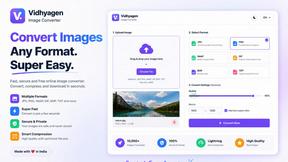
VidhyaGen
Fast, free, and privacy-first browser tool to convert, crop, resize, and compress images locally without server uploads.

Presentation Intelligence
AI-native presentation and visual content platform that turns prompts, documents, images, videos, and data into polished, shareable decks.
AnimeWall
Free AI anime wallpaper generator. Create original HD anime wallpapers and avatars from text prompts.

DigiCakey
Easily share your custom creation with friends via a simple link, providing a thoughtful alternative to traditional cards.