

product Details
Explore More
Alternatives
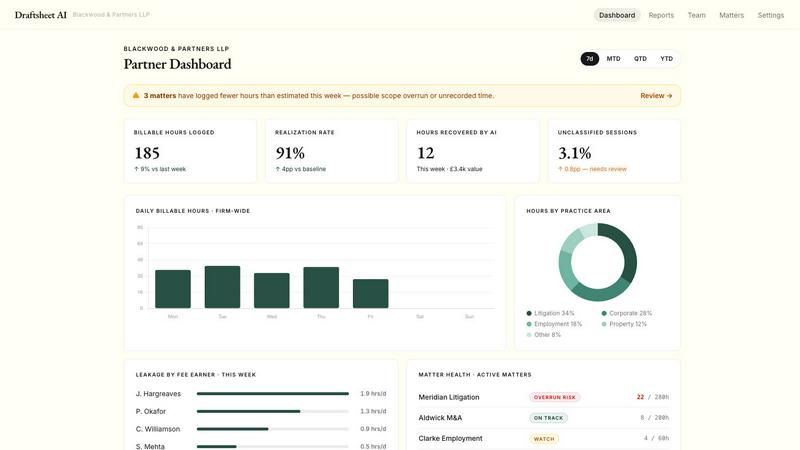
About Draftsheet AI
Draftsheet AI is an innovative, AI-powered time-tracking solution designed specifically for law firms to combat the pervasive problem of underbilling. The average fee earner under-reports 48 billable minutes per day, which at a rate of £250 per hour translates to an annual loss of £48,000 per fee earner. Draftsheet AI addresses this by running silently in the background on each lawyer’s machine, monitoring active applications and document titles without interrupting workflow. It captures billable hours that lawyers often forget to log due to cumbersome manual time-tracking tools. The solution is built end-to-end for legal billing, not as a generic tracker with a law firm skin. It ensures no sensitive content is recorded, maintaining strict privacy and security through encrypted activity logs, minimal data capture, and DPA compliance. Lawyers simply work as usual, and at the end of the day, they spend about 10 minutes reviewing AI-generated timesheet entries. The AI groups activity into sessions, matches clients and matters, assigns billing codes, and writes narratives. Every edit made by a fee earner retrains their personal model, making the system more accurate over time. Draftsheet AI is ideal for solo practitioners, small firms, and mid-sized firms seeking to recover lost billable time, improve billing accuracy, and increase overall revenue. It offers a free pilot period, per-seat annual contracts, and integrates directly with billing systems like Clio and LEAP.
Features
Passive Activity Capture
Draftsheet AI runs silently in the background on each fee earner’s machine, capturing active application names, window and document titles, browser tab titles and domains, calendar event titles and durations, and active or idle timestamps. It never captures keystrokes, screenshots, file contents, email body text, full URLs, or clipboard contents. This ensures lawyers can focus entirely on their work without interruption, while the system automatically logs all billable activity. The data is encrypted and compliant with data protection regulations, providing peace of mind for both lawyers and clients.
AI-Powered Timesheet Generation
At the end of each day, a single click triggers the AI to group captured activity into logical sessions, match them to clients and matters, assign appropriate billing codes, and draft accurate narrative descriptions. The AI learns from every edit a fee earner makes, such as reassigning a client, correcting a billing code, or tweaking a narrative. This continuous learning means the system becomes more precise and personalized over time, significantly reducing the effort required for time tracking and minimizing errors associated with manual reconstruction.
Fee Earner Dashboard
Each fee earner sees a dedicated dashboard displaying only their own work. The dashboard presents pre-filled time entries built from the passive activity capture. Users can approve or dismiss auto-captured entries, reassign entries to different clients or matters, merge or split sessions, and edit AI-drafted narratives. The entire review process is designed to take under 10 minutes per day, allowing lawyers to quickly finalize their timesheets without administrative burden. Entries can then be exported directly to the firm’s billing system.
Revenue Reporting and Analytics
Practice managers gain a real-time, firm-wide view of billing performance through comprehensive revenue reporting. The dashboard shows hours captured, approved, and exported per fee earner, utilization rates by individual and team, a comparison of billed versus recorded time to highlight leakage, and a breakdown by client and matter. This data updates in real-time as entries are approved, providing managers with actionable insights before month-end deadlines. It enables firms to identify underperforming areas, optimize resource allocation, and maximize revenue recovery.
Use Cases
Solo Practitioners Recovering Lost Revenue
A solo practitioner handling multiple clients and matters often struggles to log time accurately between court appearances, client meetings, and document drafting. Draftsheet AI captures every minute spent on active work, including document editing, email correspondence, and legal research. At the end of the day, the solo lawyer spends 10 minutes reviewing AI-generated entries, approving accurate time logs, and exporting them directly to their billing system. This ensures no billable minute is lost, directly increasing the practitioner’s revenue without adding administrative overhead.
Mid-Sized Firms Improving Billing Accuracy
In a mid-sized firm with multiple fee earners, manual time tracking leads to inconsistent and incomplete records, causing significant revenue leakage. Draftsheet AI standardizes time capture across all lawyers by running silently on each machine. The AI automatically assigns billing codes and client matters based on the captured activity, reducing human error. Practice managers use the revenue reporting dashboard to monitor utilization rates and identify fee earners who consistently under-report. This data-driven approach allows the firm to implement targeted training and recover thousands of pounds in lost billable hours annually.
Large Firms Streamlining Month-End Processes
Large law firms face a scramble at month-end when fee earners must reconstruct time entries from memory, leading to inaccuracies and delays. Draftsheet AI eliminates this by providing pre-filled, accurate timesheets daily. Fee earners review and approve entries each day, so by month-end, all time is captured, approved, and ready for billing. The automated integration with billing systems like Clio and LEAP ensures seamless data transfer, reducing administrative workload for both lawyers and billing staff. This streamlines the entire billing cycle and improves cash flow.
Compliance and Privacy-Sensitive Environments
Law firms handling sensitive client information must ensure that time-tracking tools do not compromise confidentiality. Draftsheet AI is designed with security as a core principle. It never captures keystrokes, screenshots, file contents, email body text, or full URLs. All activity logs are encrypted, and the system is DPA compliant as standard. This makes it ideal for firms that require robust data protection while still benefiting from automated time capture. Lawyers can trust that their work remains private, and clients’ information is never exposed.
Pricing
Draftsheet AI offers two pricing plans based on a per-seat annual contract with no setup fees and a free pilot period.
Solo Plan: Ideal for sole practitioners and small firms. Includes passive activity capture, AI timesheet generation, billing code auto-assignment, CSV and PDF export, 30-day data retention, import clients and matters, email and chat support. Does not include revenue reporting, direct billing system integrations, or phone support.
Firm Plan: Ideal for mid-sized firms. Includes everything in the Solo plan, plus revenue reporting, direct billing system integrations (e.g., Clio, LEAP), client and matter management, utilization dashboard, 90-day data retention, and phone support.
Firms are encouraged to book a call to discuss specific needs and receive a tailored quote. The free pilot period allows firms to experience the full functionality before committing to an annual contract.
Frequently Asked Questions
How does Draftsheet AI capture time without recording sensitive content?
Draftsheet AI captures only metadata about active applications, such as the application name, window title, and browser tab domain. It never captures keystrokes, typed text, screenshots, screen recordings, file or document contents, email body text, full URLs, or clipboard contents. This ensures that while the system knows you are working on a document titled “Settlement Agreement v3.docx” in Microsoft Word, it cannot read the actual text within the document. All captured data is encrypted and handled in compliance with data protection regulations.
How long does it take for fee earners to review their timesheet each day?
The review process is designed to take under 10 minutes per day. After the AI groups captured activity into sessions, matches clients and matters, assigns billing codes, and drafts narratives, fee earners simply review the entries. They can approve, dismiss, reassign, merge, split, or edit entries as needed. The AI learns from every edit, making future entries more accurate and reducing review time even further over time.
Does Draftsheet AI integrate with my existing billing software?
Yes, Draftsheet AI offers direct integrations with popular legal billing systems such as Clio and LEAP. It also supports CSV and PDF exports for firms using other systems. The integration allows approved time entries to be pushed directly into the billing software, eliminating manual data entry and reducing errors. The team can provide details on specific integrations during a consultation.
What is the pricing model and is there a free trial?
Draftsheet AI offers a free pilot period so firms can test the solution without commitment. After the pilot, the pricing is based on a per-seat annual contract with no setup fees. There are two main plans: Solo, ideal for sole practitioners and small firms, and Firm, designed for mid-sized firms with additional features like revenue reporting, direct billing integrations, and phone support. Firms can cancel at any time during the pilot period with no penalty.
Similar to Draftsheet AI


Arceus Legal
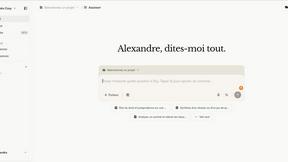
Arceus Legal provides fast, predictable AI-powered contract review and drafting for growing companies with upfront pricing and guaranteed turnaround.
Commentari
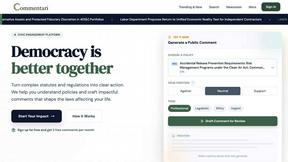
Commentari empowers you to transform community insights into impactful legal comments with easy-to-use AI tools.