

product Details
Explore More
Alternatives
About ProcessSpy
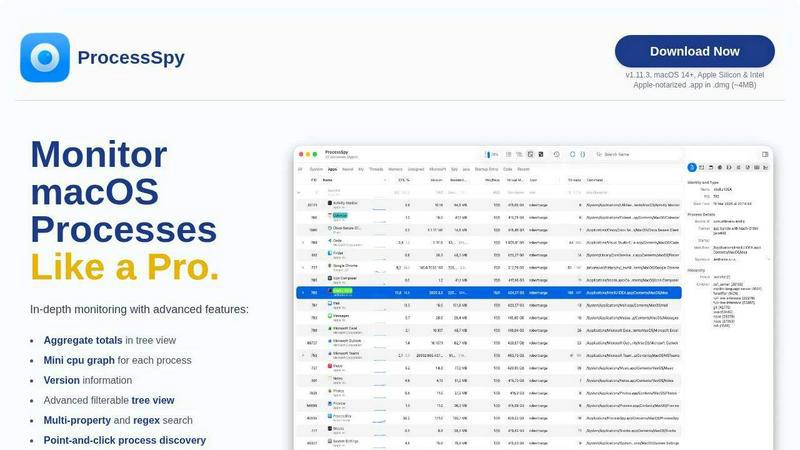
ProcessSpy is a professional-grade system monitoring and process exploration utility designed exclusively for macOS. It serves as a powerful, native alternative to tools like Sysinternals Process Explorer, providing deep visibility into system and application activity that goes far beyond what Apple's built-in Activity Monitor can reveal. The tool is engineered for developers, system administrators, IT professionals, and power users who need to diagnose performance issues, debug application behavior, manage resources, and understand the intricate relationships between running processes on their Mac. Its core value proposition lies in exposing hidden details—such as full command-line arguments, environment variables, open files and network connections, and process hierarchies—within a fast, native Mac interface. By leveraging macOS-specific APIs without cross-platform bloat, ProcessSpy delivers a responsive and integrated experience that is both comprehensive and efficient, making advanced system introspection accessible and practical for professional workflows.
Features
Advanced Hierarchical Process Tree
ProcessSpy visualizes all running processes in a detailed tree view that clearly displays parent-child relationships, making it easy to understand which applications launched which services or sub-processes. This view goes beyond a simple list by showing aggregate totals for CPU usage, memory consumption, and thread counts for entire branches of the process tree. This allows you to quickly identify which application family is consuming the most resources, providing crucial context for performance troubleshooting and system management that flat process lists cannot offer.
Multi-Property and Regex Search
The tool features a powerful quick-search system that supports searching across multiple process properties simultaneously using both plain text and regular expressions. For instance, you can search for processes with "java" in the name AND "-Xmx" in their command-line arguments. This granular filtering capability enables precise targeting of specific processes, even among dozens with similar names, drastically reducing the time needed to find the exact process you need to inspect or manage within a complex system environment.
JavaScript-Based Custom Filters
For ultimate control, ProcessSpy allows users to define custom filters using JavaScript. This feature enables the creation of highly complex, conditional logic to show or hide processes based on any available property, such as start time, CPU usage thresholds, or specific command-line parameters. This programmatic approach to filtering is invaluable for creating persistent, saved views tailored to specific monitoring scenarios, such as isolating all processes from a particular developer certificate or those consuming memory above a defined limit.
Comprehensive Process Context & Inspection
Beyond the process list, ProcessSpy provides deep inspection panels for each selected process. You can view open files and network connections, loaded dynamic libraries (dylibs), and—with a paid license—critical details like environment variables, code signatures, entitlements, and Info.plist contents. This centralized access to forensic-level details is essential for debugging launch issues, verifying security settings, understanding dependencies, and forcefully terminating unresponsive applications with confidence.
Use Cases
Developer Debugging and Profiling
Developers can use ProcessSpy to debug application launches and runtime behavior. By inspecting environment variables, command-line arguments, and loaded libraries for their software, they can diagnose why an app fails to start or behaves incorrectly in certain environments. The ability to distinguish between multiple instances of the same runtime (like different Java versions) by viewing their full paths and versions is particularly crucial for managing complex development setups with multiple SDKs.
System Performance Analysis and Optimization
IT professionals and power users can leverage the aggregate resource totals in the tree view and the historical recording feature (paid) to identify resource hogs and performance bottlenecks. By tracking CPU and memory history and seeing which group of processes is responsible for high load, users can make informed decisions about terminating unnecessary services, optimizing startup items, or identifying memory leaks in long-running applications.
Security Auditing and Malware Detection
ProcessSpy acts as a security tool by revealing hidden processes, unsigned code, and suspicious parent-child relationships that may indicate malware or unwanted software. Inspecting entitlements and signature information helps verify the legitimacy of processes. The ability to flag newly discovered processes and remember finished ones (paid) creates an audit trail, making it possible to spot unexpected or short-lived executions that could be malicious.
Managing and Terminating Stubborn Processes
When applications freeze or become unresponsive, Activity Monitor may not provide enough information to safely force-quit related processes. ProcessSpy's detailed tree view shows all child processes and dependencies. This ensures users can terminate an entire application family completely, preventing orphaned processes from consuming resources. Viewing open files also helps identify which process is holding a lock on a file that needs to be accessed or deleted.
Frequently Asked Questions
Is ProcessSpy safe to install on my Mac?
Yes, ProcessSpy is completely safe. The application is Apple-notarized, meaning it has been scanned and approved by Apple for malicious content. It is distributed as a signed .app file inside a .dmg disk image, ensuring its integrity. It runs natively and efficiently on both Intel and Apple Silicon Macs without requiring lower-level system permissions that could compromise security.
What versions of macOS are supported?
ProcessSpy is designed for modern macOS systems. It supports macOS 14 (Sonoma) and newer, including the latest versions. The developer specifically notes support for future macOS 26 (Tahoe), indicating a commitment to maintaining compatibility with upcoming Apple operating system releases. It is optimized for the latest APIs and does not support older, legacy versions of macOS.
What is the difference between the free and paid features?
The free version of ProcessSpy offers robust core functionality, including the advanced process tree, multi-property search, JavaScript filters, and viewing open files/connections. A one-time license purchase unlocks advanced features such as viewing environment variables and process entitlements, recording and exporting CPU/memory history, remembering finished processes for later review, and inspecting detailed bundle information like Info.plist contents.
What is the licensing model for the paid version?
The license for ProcessSpy's premium features is a one-time purchase of $24.99. This is a lifetime license that includes all future updates and new features at no additional cost. The license is per user and can be used on an unlimited number of personal devices, making it a cost-effective solution for professionals who use multiple Macs.
Similar to ProcessSpy


stackledge
A strictly human-verified software directory. Discover active SaaS apps, practical AI tools, and custom n8n workflows without bot-scraped spam.

WidgIq
Provide an AI-powered customer support widget for your website

TrueProxies
Residential and datacenter proxy provider with 50M+ ethically sourced IPs across 150+ countries. Unlimited from $4.08/hr, pay-per-GB from $1.64/GB.

Product Launch Checklist
A free launch checklist for SaaS, apps, AI tools and more. Every step says why it matters and when you can skip it.

Forms Plugin
The #1 Native Form Builder Plugin for Framer - No Code, No Embeds, No External Platforms.

Chatit Me - Free Random Chat Alternative
Chat with random strangers online for free on ChatIt.me. Enjoy safe, anonymous, and instant 1-on-1 conversations with people worldwide