

Sprite-AI
Sprite-AI turns your text descriptions into pixel-perfect, game-ready sprites instantly with no drawing skills required.
product Details
Explore More
Alternatives

About Sprite-AI
Sprite-AI is an AI-powered pixel art generator specifically designed to meet the rapid asset creation needs of indie game developers, hobbyists, and game prototypers. The platform allows users to describe a sprite in plain English, and the AI produces a clean, game-ready pixel art image in seconds. Output sizes include 32x32, 64x64, and 128x128 pixels, with each sprite correctly proportioned for its intended role, such as icons, items, characters, or hero and boss art. Once a sprite is generated, a built-in pixel editor provides essential tools like paint, erase, fill, and color-pick, enabling users to fine-tune every pixel before export. The final asset can be downloaded as a transparent PNG file that integrates seamlessly with major game engines including Unity, Godot, GameMaker, and Unreal. Sprite-AI also features a community gallery for inspiration, prompt guides for better results, and a token-based pricing model that ensures users only pay for what they generate. The platform is built for speed and simplicity, removing the barrier of traditional art skills so anyone with a creative idea can produce professional-grade 2D assets quickly.
Features
AI Sprite Generation from Text Descriptions
The core feature of Sprite-AI is its ability to transform natural language descriptions into pixel art sprites. Users simply type what they imagine, such as "fire-breathing dragon, red scales" or "knight with sword and shield," and the AI interprets the prompt to generate a clean, game-ready image. This eliminates the need for drawing skills or pixel art expertise, allowing developers to focus on game design rather than asset creation. The generator supports multiple sizes and roles, ensuring the output matches the specific needs of the project.
Built-in Pixel Editor for Refinement
After generation, every sprite can be edited using a suite of intuitive pixel art tools. The built-in editor includes paint, erase, fill, and color-pick functions, giving users complete control over the final appearance. This feature is essential for adjusting small details, correcting color palettes, or adding personal touches to make each asset unique. The editor works directly within the browser, so there is no need to switch to external software for touch-ups.
Game Engine Ready Export
All sprites generated on Sprite-AI are designed for immediate use in game development pipelines. The platform exports transparent PNG files that drop directly into Unity, Godot, GameMaker, and Unreal without additional processing. This compatibility saves significant time during development, as assets are already properly formatted, sized, and optimized for integration. Users can download sprites in their chosen resolution and begin implementing them in their game scenes instantly.
Token-Based Pricing and Community Gallery
Sprite-AI operates on a fair, pay-as-you-go token model that ensures users only pay for the sprites they generate. This approach is particularly beneficial for indie developers and hobbyists with varying project scopes. Additionally, the platform hosts a community gallery where users can browse creations from other members, discover prompt ideas, and share their own work. This feature fosters inspiration and collaboration within the pixel art and game development community.
Use Cases
Indie Game Development for Rapid Prototyping
Indie developers often need to iterate quickly on game concepts, requiring a steady stream of placeholder or final assets. Sprite-AI enables them to generate characters, enemies, items, and UI elements in seconds, drastically reducing the time spent on asset creation. For example, a developer building a 2D platformer can describe a "cute slime monster green and blue" and receive a usable sprite immediately, allowing them to test gameplay mechanics without waiting for an artist.
Game Jams and Hackathons
Time-constrained events like game jams demand fast asset production. Sprite-AI is an ideal tool for participants who need to produce a complete game in 48 hours. By generating sprites from text descriptions, teams can focus on coding and level design rather than pixel art. The built-in editor also allows for quick adjustments, ensuring assets fit the game's visual style without requiring extensive artistic skill.
Creating Assets for Educational or Tutorial Projects
Educators and content creators teaching game development can use Sprite-AI to quickly generate example assets for tutorials, courses, or documentation. Instead of spending time creating simple sprites from scratch, they can describe the needed asset and have it ready for demonstration. This is particularly useful for showing students how to import and animate sprites in engines like Godot or Unity.
Personal Pixel Art Projects and Hobbyist Creations
Hobbyists who enjoy pixel art but lack the time or skill to draw complex sprites can use Sprite-AI to bring their ideas to life. Whether creating custom icons for a desktop theme, designing characters for a fan game, or simply experimenting with pixel art styles, the platform provides a low-barrier entry point. The community gallery also serves as a source of inspiration for new projects.
Pricing
Sprite-AI offers three pricing tiers with a limited-time launch discount of 38% off the Creator and Studio plans. The Starter plan is priced at $5 per month and includes 8 game-ready sprites, direct export to game engines, and access to the community gallery. The Creator plan is regularly $13 per month but is currently available for $8 per month, offering 20 unique sprites, PNG and SVG exports, private asset storage, and uncensored generations. The Studio plan is regularly $39 per month but is currently $24 per month, including everything in Creator plus 75 sprites per month for full production needs. All plans allow cancellation at any time, and the launch pricing is locked in forever for early subscribers.
Frequently Asked Questions
What sizes of sprites can I generate with Sprite-AI?
Sprite-AI supports three standard pixel art resolutions: 32x32, 64x64, and 128x128 pixels. These sizes are chosen to cover common use cases in 2D game development, from small icons and items to larger character sprites and hero or boss art. The AI automatically adjusts the detail level and proportions based on the selected size to ensure the sprite looks clean and game-ready.
Can I edit a sprite after it is generated?
Yes, every sprite generated by Sprite-AI can be edited using the built-in pixel editor. The editor includes essential tools such as paint, erase, fill, and color-pick, allowing you to refine details, adjust colors, or add personal touches. This feature ensures you have full creative control over the final asset before exporting it for use in your game.
Which game engines are compatible with exported sprites?
Sprites exported from Sprite-AI are saved as transparent PNG files, which are universally compatible with major game engines. The platform specifically mentions compatibility with Unity, Godot, GameMaker, and Unreal. Because the files are standard PNGs, they can also be used in any other engine or software that supports image import, including custom game frameworks.
How does the token-based pricing model work?
Sprite-AI uses a token-based system where you only pay for the sprites you generate. Each generation consumes a token, and unused tokens do not roll over or expire within your billing cycle. The pricing plans offer different monthly token allowances, such as 8 sprites for the Starter plan, 20 for the Creator plan, and 75 for the Studio plan. This model is designed to be flexible and cost-effective for projects of all sizes.
Similar to Sprite-AI
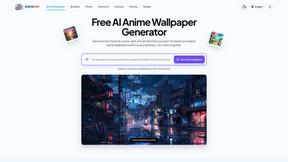
AnimeWall
Free AI anime wallpaper generator. Create original HD anime wallpapers and avatars from text prompts.
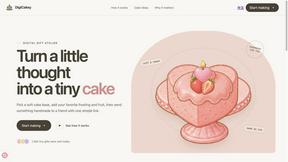
DigiCakey
Easily share your custom creation with friends via a simple link, providing a thoughtful alternative to traditional cards.


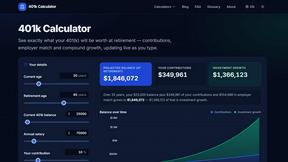
401k Calculator
401 k Calculator.info is a free online tool to estimate retirement savings, employer match, and future 401(k) growth for smarter financial planning.
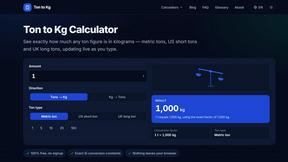
Ton to Kg Calculator
Ton To KG Calculator is a free online weight conversion tool that helps users instantly convert tons to kilograms with precision.

Clean Image AI-Powered Photo Cleanup
Clean Image is a private, client-side AI tool that removes text, logos, and blemishes from photos instantly without uploading your data.