

product Details
Explore More
Alternatives
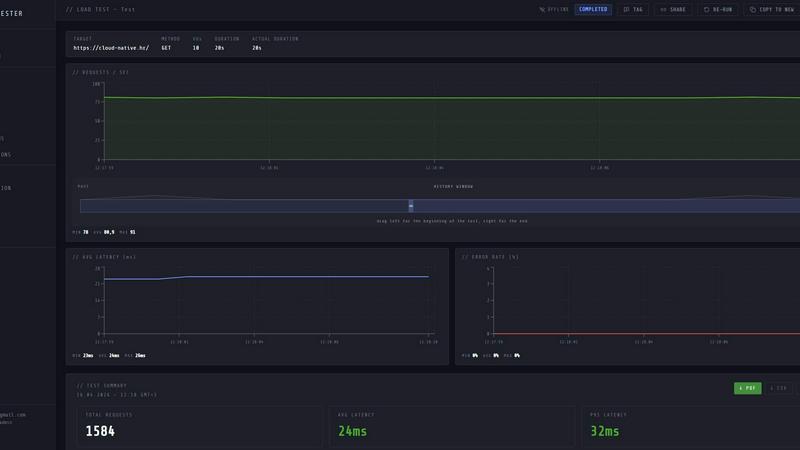
About LoadTester
LoadTester is a modern HTTP and API load testing tool built by Cloud Native d.o.o. for engineering teams that need repeatable performance checks. It allows developers and teams to run HTTP and API load tests without setting up or managing any load testing infrastructure. With LoadTester, you can create a test, choose between virtual users or requests per second, monitor live latency and error rates, review completed results, compare runs, and catch performance regressions before users notice. The platform is designed to run distributed load tests from your browser or CI/CD pipeline, providing live analytics, p95 and error-rate thresholds, scheduled baselines, and run-to-run comparisons. It supports up to 10,000 virtual users per test and up to 10,000 requests per second, with a cold start time of under 3 seconds to first request. LoadTester includes exports, scheduled tests, API access, and workflow integrations for teams that want simple, repeatable performance checks. It is built for scale, performance, and reliability, with auto-stopping based on thresholds and a typical run success rate of 99.8 percent. There is zero infrastructure to provision, making it ideal for teams that want to focus on results rather than setup and maintenance.
Features
Instant Execution, Distributed by Default
Start distributed load tests in seconds with no infrastructure setup, no worker orchestration, and no scheduling headaches. Your team focuses on results while LoadTester handles worker scaling, infrastructure coordination, and execution flow. Tests boot in under 3 seconds, workers auto-scale based on demand, and there is zero queue time before your test begins.
Live Analytics and Telemetry
Watch requests, latency, failures, throughput, and bottlenecks in real time while your test is running. The live dashboard displays key metrics including RPS, P50, P95, and P99 latency, error counts, and active virtual users. Latency distribution charts update during the run, showing performance trends over the last 60 seconds so you can identify issues as they happen.
Smart Auto-Stop with Thresholds
Set failure or latency thresholds and automatically stop tests when things go sideways. You can configure auto-stop conditions for P95 latency exceeding a defined limit, error rate surpassing a percentage, or regression compared to a baseline. This feature prevents wasted resources and ensures that problematic tests are halted immediately.
CI/CD Ready with Integrations
Run tests on every deploy with CI/CD integration, webhooks, and Slack and email alerts. LoadTester supports scheduled tests that run daily or at custom intervals, and it can trigger webhooks on completion to post result links to release bots. Export results as PDF, CSV, or JSON for sharing with your team or integrating into your existing workflows.
Use Cases
Pre-Deployment Performance Gate
Before releasing a new version of your application, run a load test against the staging environment to ensure that latency and error rates remain within acceptable thresholds. LoadTester can automatically stop the test if thresholds are breached and notify your team via Slack or email, preventing regressions from reaching production.
Spike Testing for High Traffic Events
When launching a marketing campaign or expecting a surge in traffic, use LoadTester to simulate a spike in requests per second or virtual users. Monitor how your API handles the increased load in real time, and use the results to adjust auto-scaling configurations or optimize database queries before the event.
Continuous Performance Monitoring
Schedule nightly or hourly load tests to run against your production endpoints and establish performance baselines. LoadTester compares each run against previous results, alerting you when latency increases by a defined percentage. This proactive monitoring catches performance regressions before your users notice any slowdown.
API Contract Validation in CI/CD
Integrate LoadTester into your CI/CD pipeline to run a quick load test every time a developer pushes code. The test verifies that new changes do not degrade API response times or increase error rates. Failed tests block the deployment, ensuring that only performant code reaches production.
Pricing
LoadTester offers a free plan that allows you to start running tests immediately without any upfront commitment. For teams that need higher limits on virtual users, requests per second, concurrent runs, or advanced features like scheduled tests and API access, paid plans are available. Specific pricing tier details and costs are provided on the LoadTester pricing page, which you can access from the website to see the latest options for your team size and usage requirements.
Frequently Asked Questions
How do I start a load test with LoadTester?
You start by creating a new test in the dashboard. Give your test a name, select the HTTP method (GET, POST, PUT, DELETE), enter the target URL, and choose between virtual users (VUs) or requests per second (RPS) mode. Set the rate and duration, then click run. The test launches in under 3 seconds and you can watch the results live.
What metrics are available during a live run?
During a live run, you can see real-time throughput in requests per second, P50, P95, and P99 latency, total requests and errors, active virtual users, and a latency distribution chart for the last 60 seconds. After the run completes, you get a clear summary with total requests, average latency, data sent, and data received.
Can I integrate LoadTester with my CI/CD pipeline?
Yes, LoadTester is CI/CD ready. You can trigger tests via API, set up scheduled tests, and configure webhooks to send results to your release bot. The platform also supports Slack and email alerts when tests complete or when thresholds are breached, making it easy to include performance checks in your deployment workflow.
How many virtual users or requests per second can I run?
LoadTester supports up to 10,000 virtual users per test and up to 10,000 requests per second. The platform auto-scales worker nodes to handle the load, and cold start to first request takes under 3 seconds. The free plan is available for getting started, with higher limits on paid tiers.
Similar to LoadTester




xDevTools
Secure, private developer tools. 1000+ utilities run in your browser. No data leaves your device.
AIQualityHQ
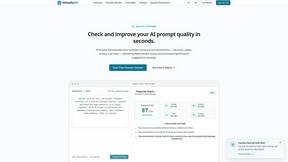
AIQualityHQ checks prompt quality for structure, safety, and privacy in under 10ms, all within your browser.

JustLaunched
JustLaunched helps indie makers schedule product launches and reach buyers by blasting listings across curated SaaS directories.