

Unifyca
Unifyca centralizes WordPress client website documentation, maintenance, audits, and backups into one unified platform for complete agency control.
product Details
Explore More
Alternatives

About Unifyca
Unifyca is a comprehensive WordPress website management platform specifically designed for agencies, freelancers, and IT professionals who oversee multiple client websites. The core problem Unifyca solves is the fragmentation of website management tasks across dozens of separate WordPress dashboards, spreadsheets, email threads, and chat messages. Instead of logging into each client site individually, Unifyca provides a single, centralized workspace where users can manage every aspect of their client portfolio. The platform combines two critical functions into one unified interface: website maintenance and website documentation. On the maintenance side, users can connect their client WordPress sites to run automated audits that detect outdated plugins, themes, and core versions, identify security risks and configuration issues, and monitor uptime. From the centralized Fix Center, users can apply safe updates and maintenance fixes in bulk across multiple sites without ever entering the WordPress admin panel. Unifyca also supports manual and scheduled backups, providing a clear backup history for each site. All maintenance actions are automatically logged, creating a detailed history that can be compiled into white-label, client-friendly reports with the user's own branding. On the documentation side, Unifyca serves as the single source of truth for every client website, storing hosting accounts, domain registrations, FTP and SSH access, email settings, SSL certificate details, credentials, brand assets, project notes, and technical information. This eliminates the chaos of searching through emails, spreadsheets, and personal files for critical information. The result is a complete operational platform that helps agencies reduce manual work, improve consistency across their client base, document every website thoroughly, and deliver professional maintenance services at scale. Unifyca offers a free plan with no credit card required, making it accessible for users to organize their first site in minutes.
Features
Centralized Website Documentation
Unifyca provides a single source of truth for every client website by centralizing all operational information in one workspace. Users can store WordPress, FTP, SSH, hosting, domain, database, email account, plugin, theme, and API credentials, all securely linked to the correct client and website. The platform also supports comprehensive technical documentation including domains, DNS settings, SSL certificates, server details, plugins, themes, premium licenses, scripts, custom code, integrations, and important website files. This eliminates the need to search through emails, spreadsheets, WhatsApp conversations, or personal files for critical information, ensuring the entire team always works with complete and reliable context.
Automated Website Audits
Unifyca automates the process of scanning every connected client WordPress site for issues that require attention. The platform detects outdated plugins, themes, and WordPress core versions, identifies security risks and configuration problems, monitors uptime, and flags SEO warnings. Users can wake up each day knowing exactly which sites need attention, prioritized by urgency. The audit connector is designed for bulk onboarding, making it efficient for agencies to connect and manage many sites at once. This proactive approach replaces reactive maintenance, allowing users to address problems before they impact client operations.
Remote Fix Center
The Fix Center allows users to review and apply WordPress updates and safe maintenance actions remotely, in bulk, and across multiple client sites without ever entering a single WordPress admin dashboard. This feature streamlines the maintenance workflow by enabling users to apply plugin updates, theme updates, and core updates from one centralized interface. The system ensures that all fixes are safe and reversible, and every action is automatically logged per site. This eliminates the repetitive task of logging into each individual site and reduces the risk of missing critical updates across a large portfolio.
White-Label Client Reports
Unifyca automatically compiles every update applied, every issue fixed, and every uptime check into a clean, professional, and client-friendly report. With a single click, users can generate a monthly maintenance log that features their own branding, including their logo and colors, with zero Unifyca branding visible. This feature provides clear proof of the value delivered to clients, making it easier to justify recurring maintenance fees and renew contracts annually. The reports transform technical maintenance logs into understandable summaries that demonstrate proactive management and professional service.
Use Cases
Managing a Portfolio of Agency Client Websites
A digital agency managing 50 or more client WordPress sites can use Unifyca to eliminate the chaos of logging into each site individually. The platform allows the agency to connect all client sites, run automated audits to identify outdated plugins and security issues, and apply fixes in bulk from the Fix Center. The centralized documentation stores all hosting credentials, domain details, and project notes for every client, ensuring any team member can quickly access the complete context of any website. The white-label reporting feature enables the agency to deliver professional monthly reports that demonstrate their ongoing value, supporting recurring revenue and client retention.
Freelance Website Maintenance and Support
A freelance web developer maintaining multiple client sites can use Unifyca to streamline their workflow and appear more professional. Instead of maintaining a personal spreadsheet of credentials and login details, the freelancer can securely store all client information in one place. Automated audits reduce the time spent manually checking each site, and scheduled backups ensure data is protected without manual intervention. The ability to generate branded reports allows the freelancer to present a polished, agency-level service to clients, justifying higher maintenance fees and building trust through transparent reporting of all work performed.
IT Professional Managing Internal or External Websites
An IT professional responsible for maintaining a portfolio of company or client websites can leverage Unifyca for comprehensive oversight. The platform provides a centralized dashboard to monitor uptime, track SSL certificate and domain renewal dates, and receive alerts before critical services expire. The secure credentials vault ensures that sensitive access information is stored safely and is only accessible to authorized team members. The maintenance history log provides a complete audit trail of all actions taken, which is valuable for compliance, internal reporting, and demonstrating due diligence in website security and upkeep.
Onboarding and Documenting New Client Websites
When an agency or freelancer takes on a new client, Unifyca provides a structured process for onboarding and documenting the website. All hosting account details, domain registrar information, FTP and SSH credentials, email settings, and SSL certificate data can be recorded immediately in the client's workspace. The platform allows users to document plugins, themes, premium licenses, custom code, and integrations, creating a complete technical snapshot of the site from day one. This thorough documentation reduces the risk of missing critical information during transitions and ensures that any team member can quickly understand and support the new client's website.
Frequently Asked Questions
What types of websites does Unifyca support?
Unifyca is specifically designed for WordPress websites. The platform uses the Unifyca Audit Connector, a plugin that is installed on each WordPress site to enable connection to the centralized workspace. This connector allows the platform to perform automated audits, apply updates, manage backups, and monitor uptime. While the maintenance and backup features are focused on WordPress, the documentation features can be used to store information about any type of website, including hosting accounts, domains, and credentials for non-WordPress sites.
How does the Unifyca Audit Connector work?
The Unifyca Audit Connector is a lightweight plugin that users install on each client WordPress site they want to manage. Once installed, the connector links the site to the user's Unifyca account. The connector enables the platform to remotely scan the site for outdated plugins, themes, and WordPress core versions, as well as security risks, configuration issues, and uptime problems. It also facilitates the application of safe fixes from the Fix Center and allows for manual or scheduled backups. The connector is designed for bulk onboarding, making it efficient for agencies to connect multiple sites quickly.
Is my client data and credentials secure in Unifyca?
Yes, Unifyca is built with security as a priority. The platform provides a secure credentials vault where users can store sensitive information such as WordPress login credentials, FTP and SSH access details, hosting account information, and API keys. All data is stored securely and is linked to the correct client and website. The platform ensures that only authorized team members have access to this information. The Unifyca Audit Connector uses secure connections to communicate with the central platform, and all maintenance actions are logged for complete transparency and auditability.
Can I generate reports with my own branding?
Yes, Unifyca offers a white-label reporting feature that allows users to generate client-friendly maintenance reports with their own branding. With a single click, the platform compiles all updates, fixes, and uptime checks from the month into a clean report that features the user's logo and colors. There is zero Unifyca branding on these reports, making them appear as if they were generated by the user's own company. This feature is designed to help agencies and freelancers demonstrate the value of their maintenance services to clients and justify recurring fees.
Similar to Unifyca
Video2URL
Turn videos, images, PDFs, and files into shareable links with fast uploads and privacy-friendly controls.
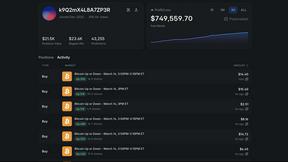
Polymarket Trading Bot For Crypto
An automated trading bot for Polymarket that executes high-frequency arbitrage and hedging strategies on 5-15 minute crypto markets.

Shadcn Examples
Shadcn Examples offers reusable React and Tailwind UI components and templates for building efficient web applications.