

Alternatives to SubcueAI
SubcueAI provides real-time AI answer suggestions during video interviews by capturing audio and transcribing questions.
Explore 20 alternatives to SubcueAI. Compare features, pricing, and find the best fit for your needs.
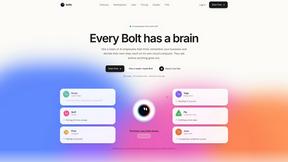
Bolts
AI employees with a brain that think, remember your business and work 24/7 on their own cloud computers.
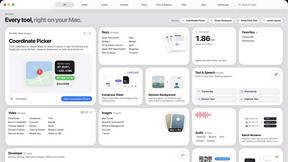
Toolbox
96 private Mac tools in one app: compress video, sign PDFs, remove backgrounds, transcribe. Offline, no account, pay once.



Safe Outreach
AI-powered platform that evaluates the safety of LinkedIn automation tools and helps reduce the risk of account restrictions.

JevModel
Run the Jev decision model in your browser: 3 live runs without signup, then 100,000 free tokens, plus a Jev API.


Emailyy
Free email tools for signatures, subject lines, HTML previews, word counts, and email headers. Browser-based, simple to use, and no signup required.

Uniclip
Clip pages, take full-page screenshots and batch-capture list data to Notion, Feishu, Obsidian, Markdown, CSV or JSON.
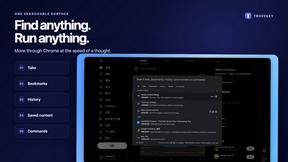
TroveKey
Search tabs, Chrome bookmarks and history, run browser commands, and save webpages and social posts locally—no account.
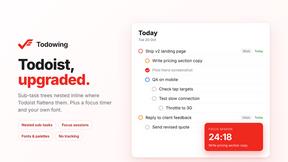
Todowing
Chrome extension that shows nested sub-tasks inline in Todoist's Today, Upcoming, Filters, and Labels views. Free tier, $19.99 lifetime unlock.

LightScreen
Free light screen tool online. Turn any display into a flashlight, ambient light, or solid-color screen. No download or sign-up.

FreeVideoGenerator
Free AI video generator: turn text prompts and photos into video clips with Sora 2, Veo 3.1, Wan and more. Free starter credits, no watermark download


ButterShare
ButterShare is a browser-based peer-to-peer file transfer tool that lets you send large files and folders directly between devices without signup or c
AI Email Filter
AI Email Filter sorts incoming mail into folders using plain-language prompts you write. Works with any IMAP mailbox; bring your own LLM if you want.


Product Launch Checklist
A free launch checklist for SaaS, apps, AI tools and more. Every step says why it matters and when you can skip it.
Kody Tools
Free collection of online developer utilities, code formatters, and digital converters designed to streamline your daily workflow.
About SubcueAI Alternatives
SubcueAI is a real-time AI interview assistant designed for macOS and Windows users who want to improve their performance during job interviews. It falls under the Productivity & Management category, functioning as a specialized tool that listens to video calls on platforms like Zoom, Google Meet, and Microsoft Teams, transcribes questions, and generates context-aware answers using GPT-4o. While SubcueAI is effective for behavioral, technical coding, and case interviews, users often look for alternatives due to factors such as pricing tiers that may not fit a tight budget, a need for broader platform compatibility beyond the major video conferencing apps, or a desire for additional features like integrated resume analysis or more granular customization of response styles. Some users also seek options that offer a free tier or a more generous trial period to test the service before committing. When choosing an alternative to SubcueAI, it is important to evaluate several key criteria to ensure the tool meets your specific needs. First, consider the accuracy and latency of the real-time transcription and answer generation, as even a slight delay can disrupt the flow of an interview. Second, look for compatibility with your preferred video conferencing software and operating system, as some tools may only support Windows or lack integration with less common platforms. Third, examine the depth of the AI’s context awareness, such as whether it can adapt to different interview formats like behavioral or case studies without requiring manual prompting. Finally, review the pricing model and data privacy policies, ensuring the tool offers a fair value for its feature set and that your interview data is handled securely, especially if you are discussing sensitive information about past employers or confidential projects.
FAQs about SubcueAI Alternatives
What is SubcueAI?
SubcueAI is a real-time AI interview assistant designed to help users improve their performance during video interviews. It captures audio from platforms like Zoom, Google Meet, and Microsoft Teams, transcribes the interviewer's questions, and generates context-aware answer suggestions powered by GPT-4o. The tool is available for both macOS and Windows operating systems.
Who is SubcueAI for?
SubcueAI is primarily built for job seekers and professionals who want to enhance their performance in live video interviews. It is suitable for candidates preparing for technical coding interviews, behavioral interviews, and case interviews. The tool is also useful for individuals who may experience anxiety during interviews and need real-time support to structure their responses.
Is SubcueAI free?
SubcueAI typically operates on a paid subscription model, though specific pricing details may vary based on the plan and features selected. As a specialized AI assistant, it often offers a trial period for new users to test the tool before committing to a purchase. Users should check the official SubcueAI website for the most current pricing and free trial availability.
What are the main features of SubcueAI?
SubcueAI offers real-time transcription of interview questions from major video conferencing platforms, combined with AI-generated answer suggestions using GPT-4o. It supports multiple interview formats, including technical coding, behavioral, and case interviews. The tool is designed to work seamlessly on macOS and Windows, providing context-aware responses that adapt to the specific question being asked.