

AI Architecture Generator
AI Architecture Generator turns sketches and prompts into photorealistic renders in 30 seconds for architects and designers.
product Details
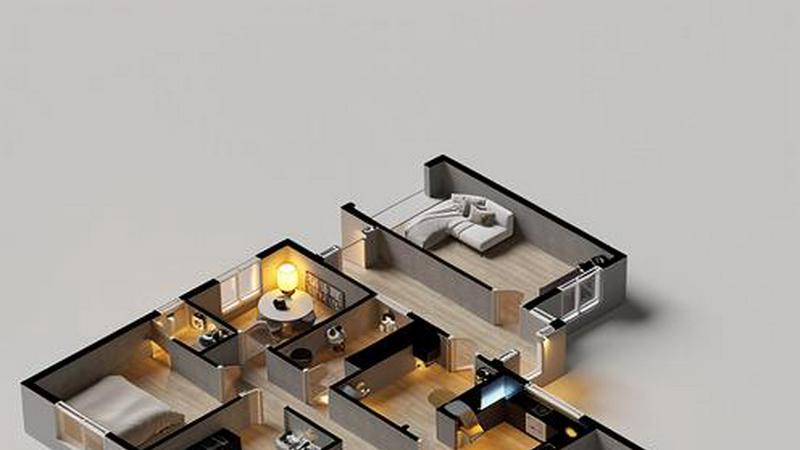
About AI Architecture Generator
The AI Architecture Generator is a powerful browser-based design tool that transforms text prompts, sketches, and reference photos into high-quality architectural renders, interior design concepts, and virtual staging visuals in under 30 seconds. Built for architects, interior designers, real estate professionals, architecture students, and design enthusiasts, this tool eliminates the need for complex rendering software setups and lengthy rendering times. The platform operates on two core modes: Pro Mode for unlimited creative freedom with full prompt control and advanced keyword panels for material, lighting, and environment specifications, and Template Mode for quick one-click generation with curated presets. Users can generate photorealistic architecture renders, interior design concepts, schematic floor plans, and virtually stage empty rooms with AI-generated furniture and decor. The tool supports a wide range of architectural styles including Modern, Minimalist, Industrial, Scandinavian, Japanese, Mediterranean, Art Deco, Victorian, Brutalist, and Contemporary. Outputs include Enhanced HD exports, 4K resolution on paid plans, and GLB preview mesh files compatible with Blender, SketchUp, and other 3D modeling tools. With a free tier offering three generations per day without signup, the AI Architecture Generator democratizes architectural visualization, making professional-grade design exploration accessible to everyone from seasoned professionals to first-year students.
Features
Pro Mode with Full Prompt Control
Pro Mode offers unlimited creative freedom for architects and interior designers who need precise control over every design element. Users can write free-form prompts up to 2000 characters, incorporating technical jargon such as BIM, parametric design, and passive house standards. The advanced keyword panel allows modular selection of materials, lighting conditions, environmental context, and camera angles. This mode supports workflow export with Enhanced HD renders, GLB preview mesh files for 3D modeling integration, and batch iteration with version tree tracking. The system interprets complex design language and constraints, delivering renders that match professional specifications.
Template Mode for Quick Generation
Template Mode provides a zero-learning-curve experience for realtors, students, and users who need fast results. The curated template library contains over 50 hand-tuned prompts organized by style, room type, and use case. Users can browse styles including Scandinavian, Modern, Industrial, Luxury, and more, then click "Use this" to generate instantly. Guided prompts offer fill-in-the-blank simplicity, such as "A ___ living room with ___ lighting," with the system completing the rest. Outputs are automatically formatted in 16:9 aspect ratio for MLS compliance, and watermark-free exports are available on Pro plans.
Sketch to Render Pipeline
The sketch to render pipeline is a flagship feature that turns rough hand drawings, line work, axonometric projections, and massing studies into photorealistic renders. Users upload a sketch or reference photo in JPG, PNG, or WebP format up to 10MB. The AI analyzes the composition, structural lines, and spatial relationships, then applies the selected style, materials, and lighting to produce a polished visual. This feature supports iterative design exploration, allowing users to test multiple directions before committing to detailed 3D modeling.
Virtual Staging for Real Estate
Virtual staging transforms empty room photos into fully furnished, styled living spaces using AI-generated furniture, decor, and lighting. Users upload a photo of a vacant room, select a style preset or custom prompt, and receive a staged image in 30 seconds. This feature saves real estate professionals 20 to 45 dollars per photo compared to traditional staging services. Outputs are automatically cropped to 16:9 for listing platforms, and watermark-free versions are available on paid plans. The AI intelligently places furniture that respects room dimensions, lighting conditions, and architectural features.
Use Cases
Early Concept Exploration for Architects
Architects use the AI Architecture Generator to rapidly explore facade styles, material palettes, lighting moods, and massing configurations before committing to detailed 3D modeling. By generating multiple design directions from text prompts or rough sketches, architects can present diverse options to clients in a single meeting. The tool supports technical language and complex constraints, enabling professionals to test parametric forms, passive house strategies, and BIM-compatible designs. This iterative approach reduces design cycle time and improves client communication.
Interior Design Concept Generation for Client Presentations
Interior designers leverage the tool to create photorealistic concepts for residential and commercial spaces, including living rooms, bedrooms, kitchens, bathrooms, and hotel lobbies. By specifying style, mood, materials, and lighting through prompts or templates, designers can quickly generate visual references that align with client preferences. The ability to produce multiple iterations allows designers to refine color schemes, furniture layouts, and spatial arrangements before presenting final proposals. This accelerates the approval process and enhances client confidence.
Virtual Staging for Real Estate Listings
Real estate agents and property managers use virtual staging to transform empty room photos into inviting, furnished spaces that attract potential buyers. By uploading photos of vacant rooms and selecting a style preset or custom prompt, agents can generate listing-ready images in seconds. This feature eliminates the cost and logistics of physical staging while providing MLS-compliant outputs. The AI ensures furniture placement respects room proportions and lighting, creating realistic and appealing visuals that drive engagement and faster sales.
Architecture School Projects and Student Workflows
Architecture students use the AI Architecture Generator to produce presentation-quality visuals for studio projects, design critiques, and portfolio submissions. The tool enables students to quickly generate schematic floor plans, facade studies, and interior concepts from prompts or sketches. By testing multiple design directions and exploring various styles, students can develop stronger design narratives and visual communication skills. The free tier allows daily generation without financial commitment, making it an accessible resource for academic environments.
Frequently Asked Questions
How does the AI Architecture Generator work?
The AI Architecture Generator uses advanced machine learning models trained on millions of architectural and interior design images. When you input a text prompt, upload a sketch or reference photo, or select a template, the AI analyzes the composition, style, materials, lighting, and spatial relationships. It then generates a photorealistic render that matches your specifications. The process takes approximately 30 seconds. You can refine outputs by adjusting prompts, keywords, or styles, and iterate as needed. The tool supports both free-form prompts for professionals and guided templates for quick results.
What file formats and resolutions are supported for outputs?
Outputs are available in Enhanced HD resolution by default, with 4K resolution and watermark-free exports available on paid plans. The platform supports JPG, PNG, and WebP formats for input sketches and reference photos up to 10MB. Pro Mode users can export GLB preview mesh files compatible with glTF viewers such as Blender, SketchUp, model-viewer, and AR Quick Look. Batch iteration with version tree tracking is available for workflow management. All outputs are optimized for web and presentation use.
Is there a free trial or free tier available?
Yes, the AI Architecture Generator offers a free tier that provides three generations per day without requiring signup or credit card. This allows users to test the tool, explore templates, and generate basic renders. Free tier outputs include watermarks and standard resolution. For unlimited generations, 4K resolution, watermark-free exports, and advanced features like batch iteration and GLB mesh export, users can upgrade to a paid plan. The free tier is ideal for students, casual users, and professionals evaluating the tool.
Can I use my own sketches or reference photos as input?
Yes, the tool supports uploading sketches, line drawings, axonometric projections, massing studies, and reference photos as input. Accepted formats include JPG, PNG, and WebP up to 10MB. The AI analyzes the uploaded image to understand composition, structural lines, and spatial context, then applies your selected style, materials, and lighting to generate a render. This feature is particularly useful for architects and designers who want to visualize rough concepts or iterate on existing designs. The sketch to render pipeline is a core functionality of both Pro Mode and Template Mode.
Similar to AI Architecture Generator


Chatit Me - Free Random Chat Alternative
Chat with random strangers online for free on ChatIt.me. Enjoy safe, anonymous, and instant 1-on-1 conversations with people worldwide
VidhyaGen
Fast, free, and privacy-first browser tool to convert, crop, resize, and compress images locally without server uploads.

Presentation Intelligence
AI-native presentation and visual content platform that turns prompts, documents, images, videos, and data into polished, shareable decks.
AnimeWall
Free AI anime wallpaper generator. Create original HD anime wallpapers and avatars from text prompts.

Artaivo
Create AI videos, images, avatars, and audio in one creative workspace.

Vismuse
Create polished AI images and videos from prompts or references for social posts, ads, flyers, album covers, and campaigns.
DigiCakey
Easily share your custom creation with friends via a simple link, providing a thoughtful alternative to traditional cards.