

Alternatives to Vivideo
Vivideo lets you turn text or images into high-quality videos up to 10 minutes long using over 30 top AI models, all free with no watermark.
Explore 20 alternatives to Vivideo. Compare features, pricing, and find the best fit for your needs.
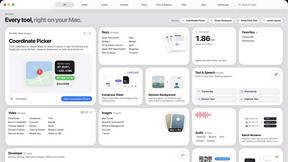
Toolbox
96 private Mac tools in one app: compress video, sign PDFs, remove backgrounds, transcribe. Offline, no account, pay once.

Outstanding Tiny Desk AI
Upload photos of you and up to 4 friends and get a 15-second Outstanding Tiny Desk AI video with AI-generated sound, in 9:16 for TikTok and Reels.

Tip Toeing in My Jordans
Put your photo in the viral Rumpelstiltskin tip toe meme and get a 12-second AI video. Free 2-second preview, no sign-up.
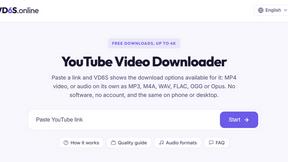
VD6S
VD6S is a free YouTube video downloader that supports HD, 4K and up to 8K downloads when available. Save videos in MP4 or audio in multiple formats.

AI Tiny Desk
Make a 19-second desk-concert video with lead and sax, full band, Halloween or pet-band modes; audio and silent MP4.
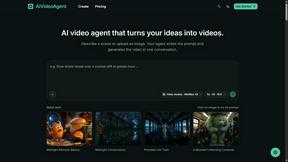
AIVideoAgent
AIVideoAgent helps you turn scene ideas into AI videos for AI-assisted creation, in a browser-based creative workspace.





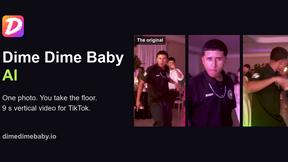







About Vivideo Alternatives
Vivideo is an advanced AI video generator that belongs to the rapidly growing category of AI-powered video creation tools. It enables creators, marketers, businesses, and educators to transform text or images into engaging videos quickly, leveraging multiple AI models and millions of stock assets to streamline production. Users commonly look for alternatives to Vivideo for a variety of reasons, including seeking more competitive pricing for their budget, desiring specific features like advanced editing controls or different aspect ratio presets, needing better integration with existing workflows, or simply wanting to explore platforms that cater to a different niche or scale of video production. When choosing an alternative to Vivideo, it is essential to evaluate the core capabilities that matter most for your specific use case. Key factors to consider include the quality and variety of AI-generated visuals and voiceovers, the availability of multilingual support and automatic captioning, the flexibility of export options such as HD or 4K resolution, and the overall ease of the editing workflow. Additionally, assess the platform’s library of stock assets, the number of supported video models, and whether it offers robust customization for aspect ratios and transitions. Prioritizing these elements will help you find a solution that meets your video creation needs without compromising on speed or professional output quality.
FAQs about Vivideo Alternatives
What is Vivideo?
Vivideo is an advanced AI video generator designed to help creators, marketers, businesses, and educators turn ideas into high-quality videos quickly. It supports both text-to-video and image-to-video capabilities, allowing users to generate visual content by entering a prompt, script, article, product description, or uploading an image. The platform automatically produces visuals, voiceovers, subtitles, music, and transitions, streamlining the entire video production process.
Who is Vivideo for?
Vivideo is built for a wide range of users including creators, marketers, businesses, and educators who need to produce engaging video content efficiently. It is particularly useful for those creating videos for TikTok, Instagram Reels, YouTube Shorts, marketing campaigns, product promotions, and tutorials. The platform aims to make professional video creation accessible to everyone, regardless of technical expertise.
Is Vivideo free?
Based on the provided product description, Vivideo offers HD and 4K export options and an intuitive editing workflow, but specific pricing details such as whether it has a free tier or free trial are not mentioned. Typically, AI video generators like Vivideo offer subscription-based plans with varying levels of usage and features. Users should check the official Vivideo website for the most current pricing and free trial availability.
What are the main features of Vivideo?
Vivideo is powered by multiple AI video models and supported by millions of stock assets, enabling users to produce videos with multilingual AI voiceovers, automatic captions, customizable aspect ratios, and HD/4K exports. It also includes an intuitive editing workflow that automates the generation of visuals, voiceovers, subtitles, music, and transitions. These features make it easy to create compelling content for platforms like TikTok, Instagram Reels, and YouTube Shorts.